CHOOSING YOUR TOOL
CMMS or Excel: when the spreadsheet is no longer enough
Many maintenance teams run on a shared spreadsheet, and it works — up to a point. Here are the signs that the point has been reached, and what changes with a dedicated tool.
What Excel does very well
Let us be fair: a spreadsheet is an excellent tool, and there is no reason to abandon it too early. It is immediate, free, flexible, and everyone knows how to use it.
- Keeping a list of assets, with number, description and location.
- Building an annual preventive maintenance plan.
- Calculating metrics yourself, if you master the formulas.
For a small team, on a stable and not very critical fleet, a well-kept spreadsheet is enough. The problem is not the tool, it is what you ask of it.
The five signs the limit has been reached
- Several people edit the file. Who has the latest version? Conflicting copies are the first symptom.
- Actual work no longer comes back. The spreadsheet describes what was planned, not what was done.
- Nobody knows where a job stands. Phoning to ask “is it done?” is the sign.
- Metrics are recalculated by hand. So irregularly, so eventually not at all.
- The field has no access to the information. The technician in front of the machine does not have the machine's history.
These five signs share one cause: a spreadsheet stores data, but it connects nothing. It does not link a work order to an asset, nor a part to a work order, nor a technician to a task.
What a dedicated tool adds, concretely
A maintenance management system — a CMMS — is not a prettier spreadsheet. The difference comes down to three things.
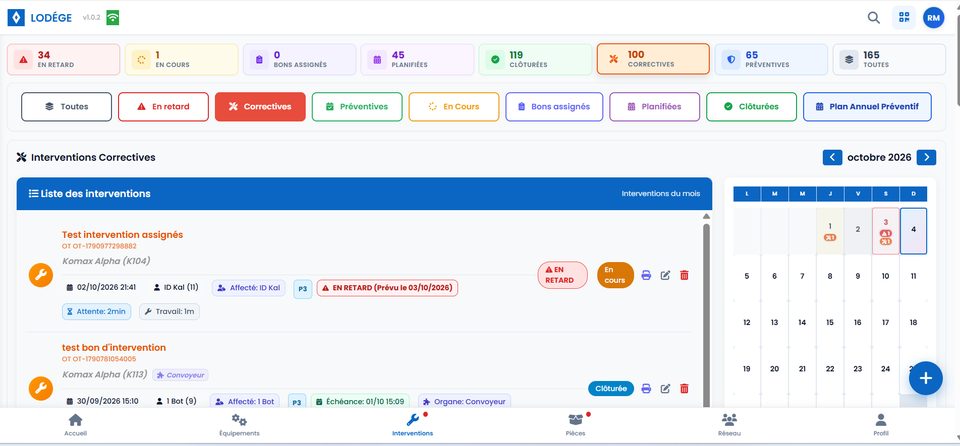
Linked data. A work order is attached to an asset, a technician and the parts consumed. That link is what answers “which assets cost me the most?” without rebuilding a pivot table.
A single version of the truth. Two people see the same state at the same moment. No more file copies, no more doubt about which version is current.
Access from the field. The technician opens the asset record on a phone, often by scanning a QR code, and updates the status on the spot.
The cost question, asked honestly
The spreadsheet looks free. It is not: the time spent consolidating, retyping and checking data is paid in technician hours — the hardest hours to recruit.
So the honest trade-off is not “free versus paid” but “administrative time versus productive time”. And there is no universal answer: it depends on the number of assets, the number of work orders per month, and the cost of an unplanned stoppage in your business.
A useful marker: if you spend more than half a day a week consolidating maintenance data, the arithmetic usually points to a tool. Below that, a well-kept spreadsheet remains defensible.
How many assets before switching?
There is no universal threshold, but three factors tip the balance.
| Factor | Rather a spreadsheet | Rather a dedicated tool |
|---|---|---|
| Number of assets | Fewer than 20, stable fleet | More than 50, or an evolving fleet |
| Work orders per month | Fewer than 15 | More than 30 |
| Cost of an unplanned stoppage | Low, production can adapt | High, hard to catch up on the line |
| Number of people entering data | A single person | Three or more |
| Need for field access | Rare | Daily |
These criteria do not add up, they multiply. A fleet of 80 assets with 10 work orders a month and a single user can live on a spreadsheet very well. A fleet of 15 critical assets with 40 work orders and three technicians cannot.
What it changes for the team, not just the numbers
A CMMS is often presented as a management tool. That is true, but the most immediate effect happens elsewhere: on the technicians' time.
- No more writing the work order on paper and retyping it at the office: they close it on the spot.
- They find the asset history before intervening, instead of rediscovering it at every breakdown.
- They no longer wait for approval to know a part is available: stock is visible.
- They see what is assigned to them, without a allocation meeting.
That is often the decisive argument internally: less administrative time, more time in front of the machine.
What a tool will not solve
No software compensates for a badly designed maintenance plan, or for a history that is never recorded. If technicians do not log their work, the most complete CMMS will produce an empty dashboard — exactly like the spreadsheet.
Success comes down to two decisions taken before the tool: define what is recorded systematically, and accept that data quality is a team responsibility rather than one more administrative task.
Migrating without breaking everything
Moving to a dedicated tool rarely fails because of the software. It fails because people want to migrate everything at once.
- Start with the asset list and its criticality. It is the foundation, and the fastest thing to rebuild.
- Record new work orders in the tool without retyping the old history. The past is used once; the present is used every day.
- Add spare-parts stock last, once work orders are being recorded: it is their consumption that gives the quantities meaning.
Three mistakes that make a CMMS project fail
We will cover these failures in a later article. In short, they almost always come down to the same cause: wanting to take everything on at once.
- Migrating the entire paper history before starting.
- Configuring the tool for weeks before the first real entry.
- Not appointing anyone responsible for the data.
LODÉGE is in development and currently free to use. Now is the moment to test migrating your data on a reduced scope, with no commitment and no mass migration.
Read next
See these principles in practice
LODÉGE brings work orders, equipment, parts and metrics into one application, available from the office and in the field.